A vulnerability in a bug bounty program let me exfiltrate PDF files uploaded by other customers straight into my account with no invitation and no relationship to the target. Like in most large file uploads, it uses a presigned POST, so the API issues a signed slot in an S3 bucket, the browser uploads the file and one last request points the server where to go and extract the file. The server checked that the address it was given had a PDF file but never checked the ownership of it.
Direct to storage, which is how everybody builds this now
This is the flow the application followed.
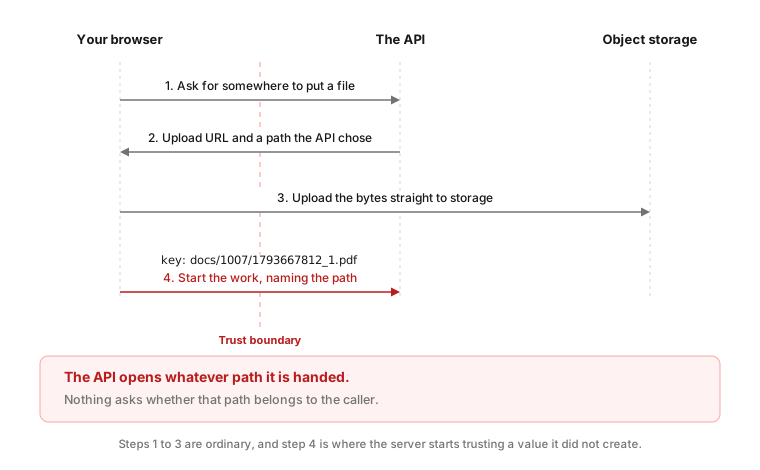
Choosing a PDF in that product goes through the same three steps as any large upload these days, because routing large files through an API spends its bandwidth and its request workers on bytes it never reads. The middle step is why the design exists, since the bytes go straight to object storage and the API never handles them. By the third call the path is arriving from my side of the connection, and the API has no other source for it:
POST /api/v1/reviews HTTP/2
Content-Type: application/json

{"files":[{"file_name":"document.pdf","source":"uploaded",
"key":"docs/1007/1793667812_1.pdf","storage":"https://<bucket>"}],
"title":"My review"}
That layout is standard and the presigned step does what it is meant to. The problem is one request later, because the path is passed as a plain parameter like any other, and nothing in that handler ties it back to the account that made the first two calls.
The problem: nobody asks whose path it is
The key is simply where that file ended up, a folder per account followed by the upload time as a Unix timestamp, and putting somebody else’s path into it gets you a clean refusal.
That path was not the only thing interesting on that request; it also carried a source field saying how the file reached storage, and the app defaults to the same value on every upload. So it was the obvious thing to poke at.
Tip: To find out whether a field takes values other than the one the browser sends, enter some random string in it and see what error message the application returns. Plenty of those checks gracefully print the whole allow list in the response; in this case the error was
Validation failed. The source parameter accepts only "uploaded" or "linked".
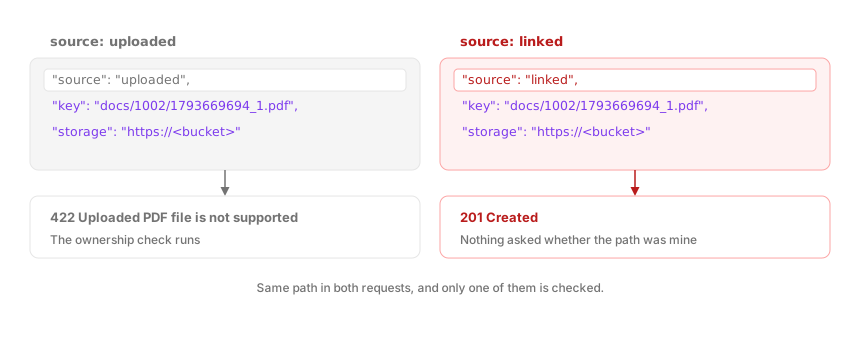
Huh, another value, let’s see what it does. Set source to linked and the server walks to the path itself, confirms the bytes begin with %PDF, and copies the file straight into my account. The ownership check behind that refusal never runs on the linked value.
This is the same request body sent twice, differing in one field, and the two answers it came back with.
Any path will do
Even a single known path would already be a cross-tenant read. What makes this worse is that the path is not something you have to steal, it is something you can build. This is how one of those paths is built, with a real one underneath the shape:
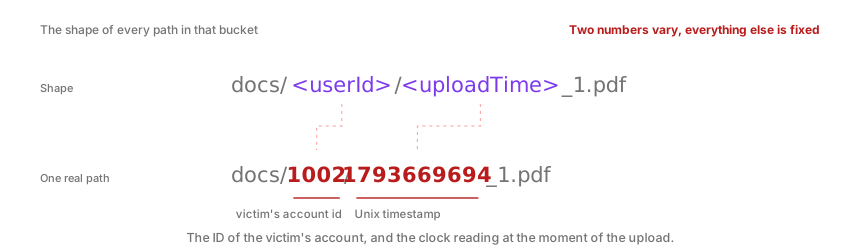
User IDs were incremental integers and a clock reading is not a secret, so there is nothing to steal in advance, only two numbers to walk through. Two requests, both naming paths under 1002, the account in the figure above, show how the server behaves:
docs/1002/1793669694_1.pdf, a path belonging to that other account: the document arrives inside the attacker’s accountdocs/1002/1793669690_1.pdf, four seconds earlier, where nothing was ever stored: refused, because there is no PDF sitting at that path
That second answer is the one that turns a single known path into a search over all of them, because the API does not reply the same way to a path holding a file and a path holding nothing. From there it is only arithmetic: pick a user id, pick a second, build the path, send it, and read the answer. Run that loop fast enough and it becomes a sweep.
This is one minute of candidate paths for a single account, and the two seconds in it that held a document.
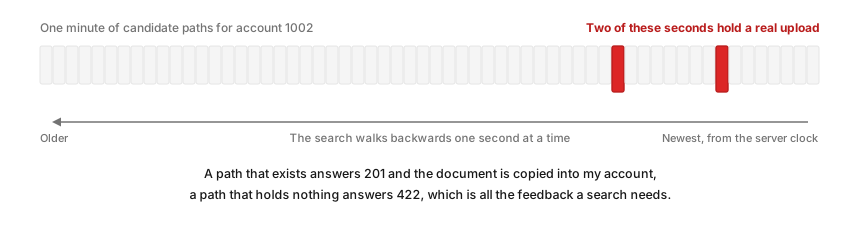
I let the AI build a Python script to do the recovery sweep, and I only had to enter the victim’s user id and the attacker’s session cookie. It asks the site what time it is and then works backwards one second at a time, trying the path an upload would have had, a few dozen every second, until one of them lands and I have somebody else’s document in my list. I only ran it against my own accounts, but that pattern is the same for every file any customer has ever uploaded.
Final Thoughts
Keep the presigned upload response rather than scrolling past it, because it is the only point in the flow where the API states which path it expects that account to own. So whenever a later request carries its own path, swap that path for somebody else’s and see what happens.
Happy hacking.
References
- ivision Research, Signed, Sealed, Delivered… Secure? (Pre-)Signed AWS URL Hacks. https://research.ivision.com/signed-sealed-delivered-secure.html